Claude Code and my pull requests live on my BUSY Bar now
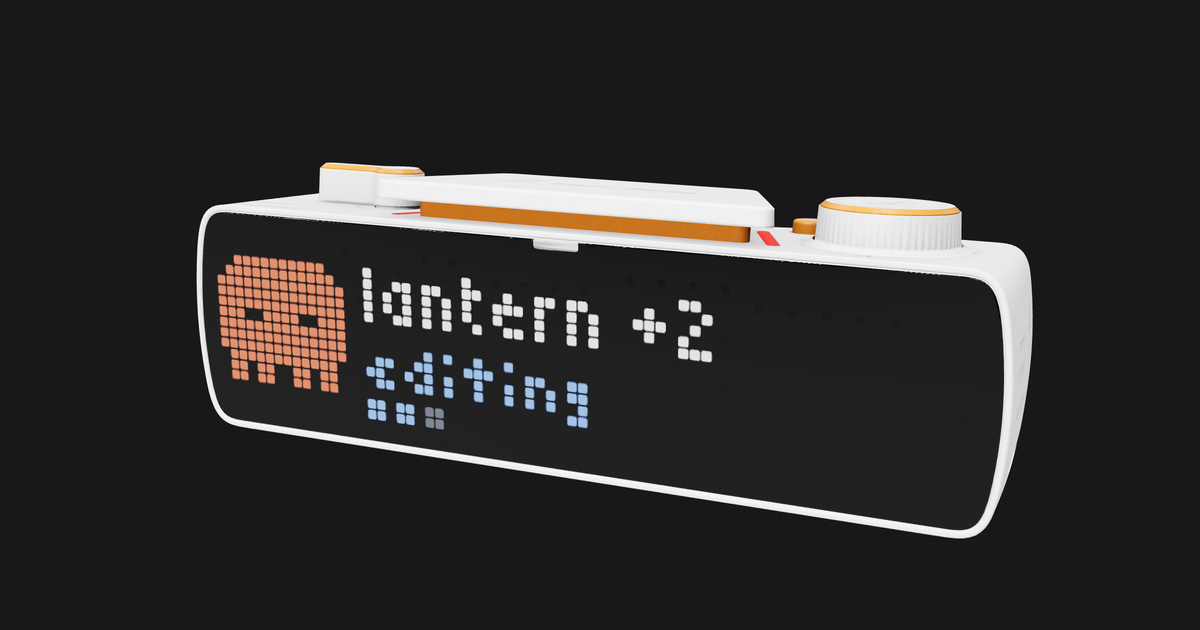
There's a small bar on my desk with a strip of LEDs on the front and a knob on top. It's a BUSY Bar, from the Flipper people. It's sold as a focus gadget. I use it to watch Claude Code work.
It also shows my pull requests now. That part wasn't the plan. A firmware update broke the first thing, and fixing it turned into building the second.
(The picture up top is a render, not a photo. BUSY publishes a 3D model of the bar, and I painted my widget onto its LEDs.)
The bar has an HTTP API and no opinions
The front is a 72 by 16 LED matrix. The back is a 160 by 80 OLED in 16 shades of gray. Plug it in over USB and it shows up as a tiny network at a fixed address, with an open HTTP API and no password.
Drawing is one POST. You send a list of elements, like text, rectangles and animations, with a position and a priority. The firmware does the rest, including scrolling text that's too long. You never send frames.
That's the whole reason this was fun. Anything on my Mac can put pixels on my desk with fetch.
Clawd lives on the front
Claude Code has hooks. A shell script runs when a session starts, when I send a prompt, before and after every tool call, when it asks for permission, and when it stops. Mine writes one small JSON file per session and nothing else.
A little daemon on the Mac watches that folder. It folds the events into phases, which are thinking, working, needs you, done and error. It picks the most urgent session and draws it.
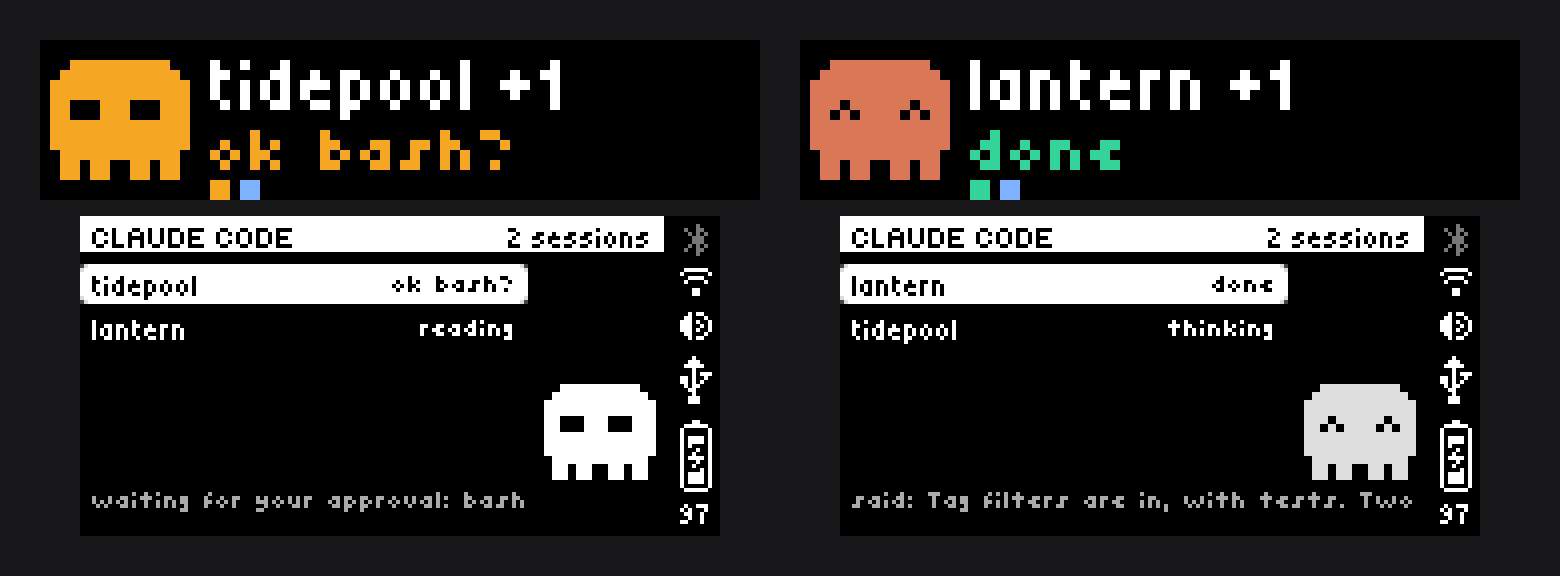
- The front shows Clawd, the project name, and what Claude is doing right now. Editing. Bash. Thinking.
- The dots under the text are one per session, colored by phase.
- The back lists every session, with the last prompt or reply scrolling along the bottom.
- Amber means it needs me. Clawd turns amber, the text says
ok bash?, and the status LED blinks.
I run three or four sessions at once. A session stuck on a permission prompt used to sit there until I tabbed past it. Now I find out by looking slightly to the left.
If every session has been idle for ten minutes, the widget clears itself and gives the screen back.
Then the firmware updated
One day Clawd was gone. In his place was a magenta square with an X in it.
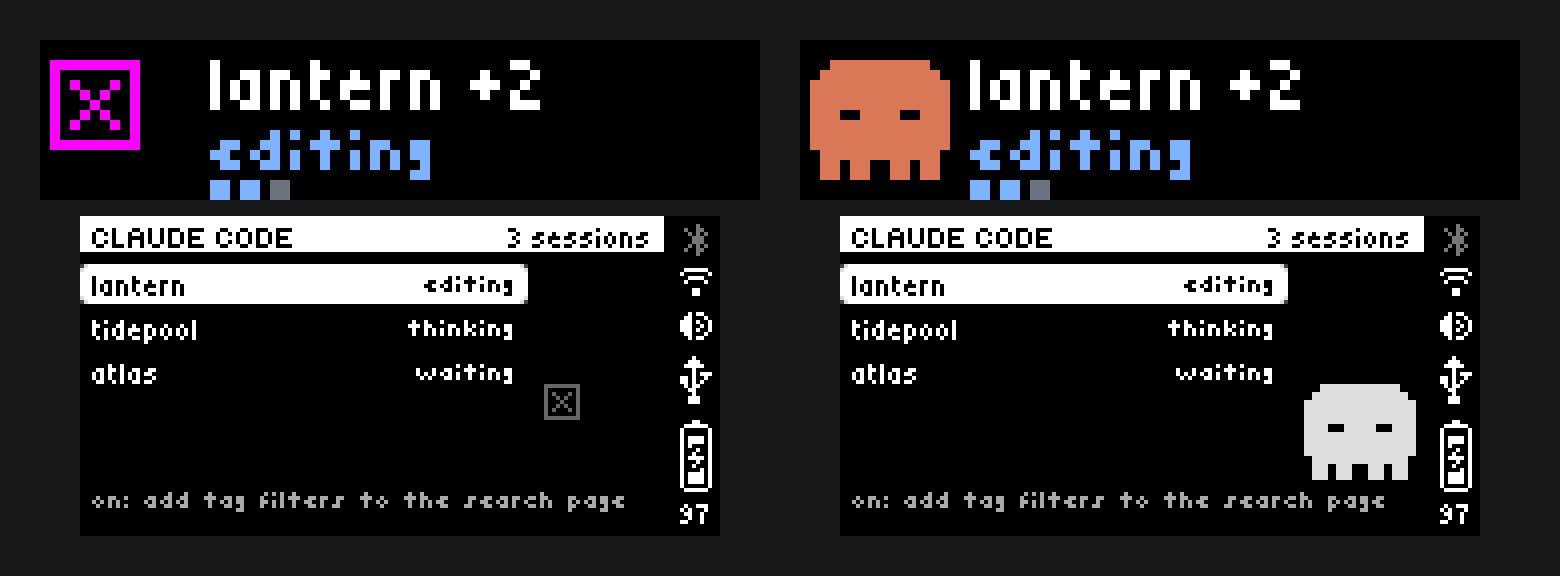
The bar auto-updates, and it had gone from 1.2.4 to 1.3.1 on its own. Everything else still drew fine. The text, the dots, the list. Just not the sprite.
The sprite is an .anim file, the bar's own animation format. I'd written an encoder for it by reading the firmware source, which is on GitHub. The file starts with an eight byte signature. The old one was bicycle0. The new firmware wants bicycle1, with a different layout behind it.
The annoying part is that nothing fails. The old file uploads fine. The draw call succeeds. The firmware just renders a broken-asset box and moves on.
So the fix was two things. Port the new reference encoder. And stop trusting that the format will hold still.
// Every firmware ships stock animations. Read one and see what it plays.
const STOCK_ANIM = '/ext/apps_assets/shared/animations/spinner_front_8x8.anim'

export async function readDeviceAnimSignature(): Promise<string> {
  const res = await bar.StorageRead({ path: STOCK_ANIM }, { as_array_buffer: true })
  const bytes = new Uint8Array(res instanceof Blob ? await res.arrayBuffer() : res)
  return new TextDecoder().decode(bytes.subarray(0, 8))
}
The widget checks that at startup now. If the bar and my encoder disagree, it logs exactly what to port and draws a still Clawd from inline pixel art. A frozen mascot beats a magenta box.
The same update added apps
1.3.1 also shipped JS apps. JavaScript that runs on the bar itself, in a tiny engine with 128 KB of heap, with the knob and the three buttons as input.
My first thought was to move the Claude widget into one. Wrong call. An app runs one at a time, and only while it's on screen. The widget has to sit there all day in the background, mirroring state that lives on my laptop. It stays a widget.
But something I open on purpose and turn a knob through? That's an app. And the thing I check most after Claude is GitHub.
PR Queue
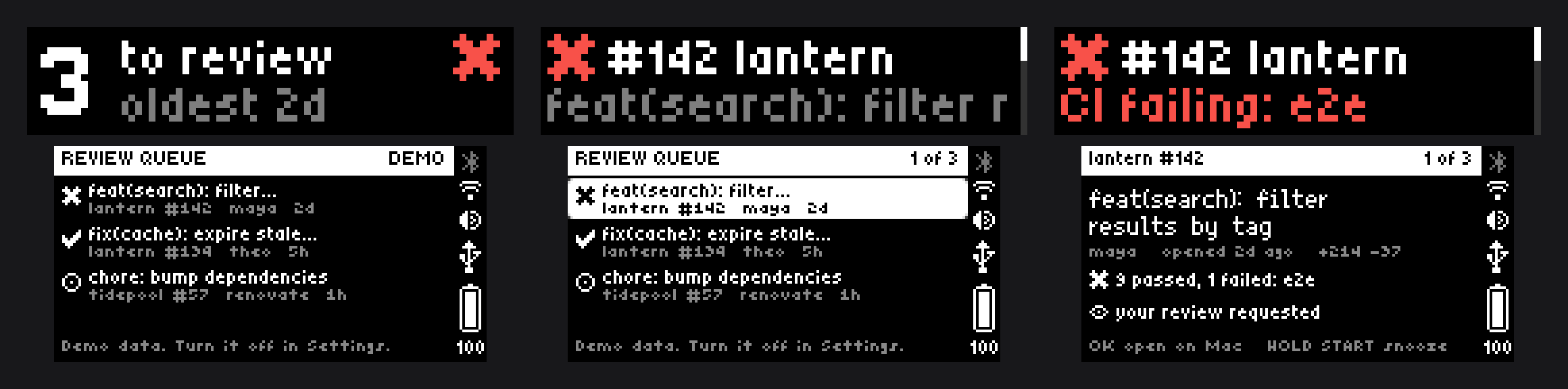
Two lists. Pull requests waiting on my review, and my own with their CI.
- The knob moves through the list. The glance sits above the first PR.
- OK opens the detail on the back. Title, author, age, checks, review state.
- OK again opens that PR in the browser on my Mac.
- START switches lists.
- Hold START snoozes a PR until something on it changes. On the glance, the same hold brings them back.
- Hold OK syncs now.
- BACK closes the detail, then quits.
It's read-only on purpose. It tells me where to look. It doesn't merge anything. The closest it gets is that second OK, and even there the bar only sends an id. The Mac looks up the address in its own last sync, so nothing the bar says is ever opened or run.
I scoped it on the hardware before writing the app. Claude drew each screen on the real bar through the HTTP API, read the framebuffer back as a PNG, and we argued about pixels that actually existed. A 1/3 counter collided with the PR number, so it became a one pixel scroll rail down the right edge. That kind of thing never shows up in a mockup tool.
A knob click lands on screen in about a quarter of a second.
No GitHub token on the bar
The first plan put a GitHub token in the app's settings. The settings form even has a "sensitive" flag for it.
That flag only masks the field in the web page. On the bar, settings are a plain file, and the same password-free USB API that makes this fun will list that folder and read it back. Anything on my Mac, or anyone who plugs in the bar, gets the token. A fine-grained token only covers one owner anyway, so "every repo I can see" meant a classic token that can also write.
So the GitHub side moved to the Mac. A small relay runs the queries through the gh CLI, which already has a login in the Keychain that covers everything I can see. It serves the finished lists on the Mac's end of the USB link only, to the bar only. The app's settings are now an address, a demo switch and a chime.
It's faster too. The bar took about 1.3 seconds to reach GitHub over TLS. It reads from the relay in about 25 milliseconds.
The trade is that the app needs the Mac awake. When it isn't, the bar says so.
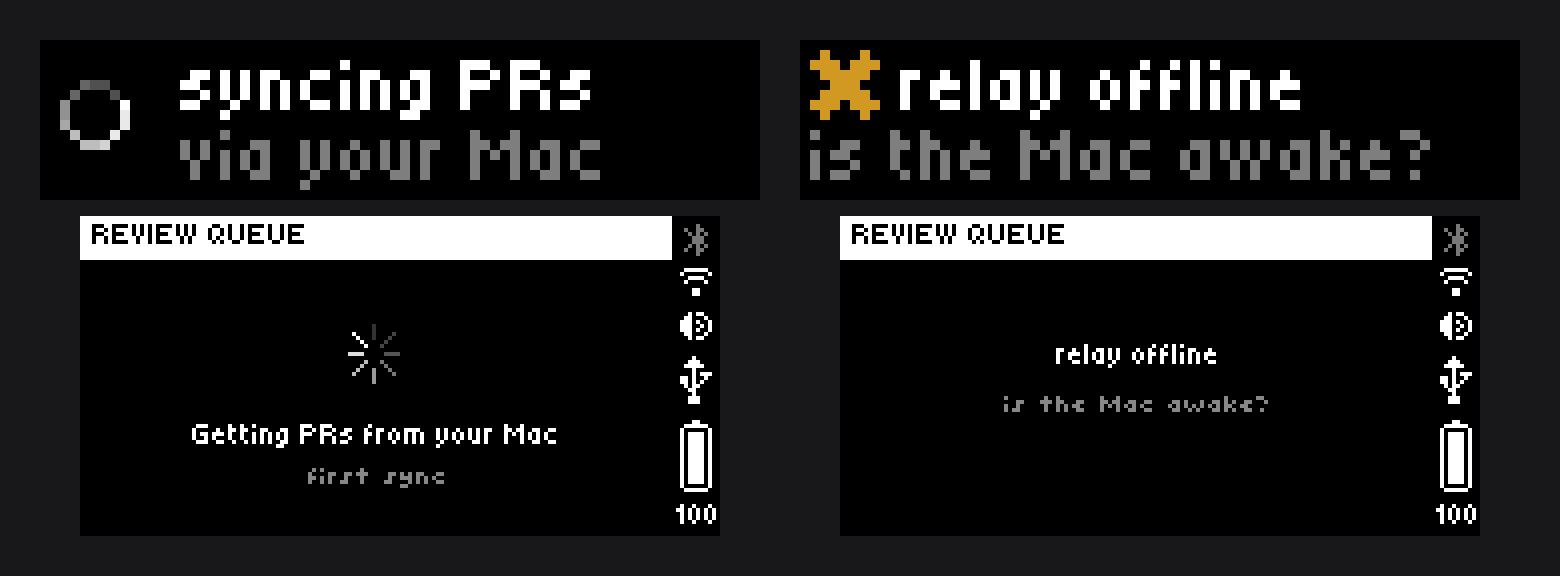
Real data broke a screen demo data never could
I built the app against four invented pull requests. The "mine" glance drew one CI icon per PR, then a tally. Looked great.
Then I pointed it at my real account, which has dozens of open PRs. The relay only sends the bar the eight most recently updated, so the glance drew four checkmarks, a big plus-number, and a tally of eight that contradicted the count right next to it.

(The green line on the right came a little later. It's further down.)
The fix was to count on the Mac. One GraphQL request can run the same search twice under two names, with different fields each time.
query($q: String!) {
  top: search(query: $q, type: ISSUE, first: 8) { issueCount nodes { ...everythingTheBarShows } }
  all: search(query: $q, type: ISSUE, first: 100) { nodes { ... on PullRequest {
    id createdAt commits(last: 1) { nodes { commit { statusCheckRollup { state } } } }
  } } }
}
top is the detail for eight PRs. all is just enough to count a hundred. The bar gets eight PRs and a few numbers, about 6 KB, and its 128 KB heap never meets the full list.
The same trick fixed the alerts. "New review request" used to mean "an id I haven't seen among the eight I was sent," so an old request with one new comment set off the LED. Now the relay compares one sync against the last and tells the bar how many are actually new.
Demo data should include an ugly case. Mine does now.
Fewer, truer numbers
Counting everything made the next problem obvious. Most of my review queue was old. Requests nobody had withdrawn on pull requests nobody had touched in a year. A request left open that long isn't waiting on anyone, and it buries the ones that are.
So both lists only hold pull requests touched in the last 30 days. The queue went from a number I ignored to a number I can clear.
The "mine" glance got one more word. Ready. A pull request is ready when it's approved, CI is green, it's not a draft and it has no conflicts. My first definition also counted green PRs in repos that don't require a review, and the count came back huge. Almost none of them had an approval. A number that big isn't something to act on, so the rule got strict.
Snoozing taught me the same thing from the other side. I snoozed everything in the queue while testing, and the bar announced inbox zero. It wasn't. Now an empty list with snoozed PRs behind it says how many, and how to get them back.
When the app is closed
An app only runs while it's on screen. So the LED that blinks for a new review request only worked when I was already looking at the list, which is the one time I don't need it.
The relay is a plain program on the Mac, though, and it can draw like any widget. When a request arrives it puts up a banner for twenty seconds and blinks the LED.
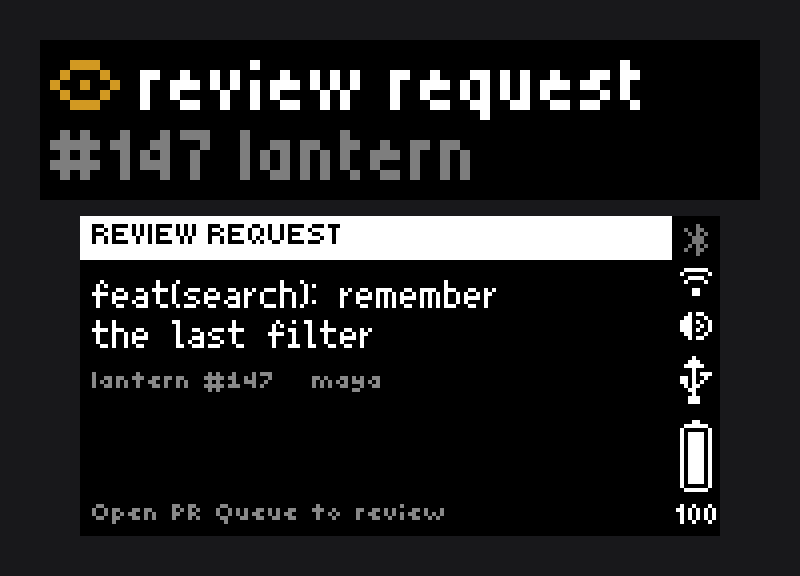
The trick is the priority. The banner draws below the app and above everything else. If PR Queue is open, the bar itself refuses the banner, and a refused draw doesn't blink the LED either. The app announces the request instead. No code checks whether the app is running. The bar's own rule does it.
Three mistakes
The test harness pressed 21 buttons into the wrong thing. The bar's API can press its own buttons, which is how the app got tested. One install failed quietly, the script didn't notice, and every press went to the bar's built-in menus. Nothing changed, by luck. The harness now refuses to send a key unless the app is installed.
The screenshot script leaked. Every image in this post is demo mode. The script that takes them turns demo mode on, checks the bar agrees, and puts my settings back. Its first run still captured real session names. Not from PR Queue. From the Claude widget, which shows through for a few seconds while an app is starting, because the app hasn't drawn yet. Now the script hangs a black rectangle at a priority between the two and waits for the app to draw over it. Demo mode protected the data I was thinking about. The leak came from the layer underneath.
The relay answered any Host header. It checked who was connecting, and my own browser passes that check. A page using DNS rebinding could have read my PR titles through it. One line fixes it. It only turned up on a second read of code that already worked.
The code
It's all at github.com/josheche/busybar. The widget, the app, the relay and the encoder. The README has a section on what to know before you copy it, which is mostly the no-password API and what that means for tokens and prompts.
It's GPL because the animation encoder is a port of the firmware's, and that's the firmware's license.
Claudedogged, obviously
I claudedogged all of it. I described what I wanted, Claude Code built it against the real hardware, and I turned the knob and complained.
Which means that for most of a day, the thing on my desk showing me what Claude was doing was showing Claude building the thing on my desk.
It's a good little bar.
Related Posts
A Keychron Nape Pro under my keyboard now does three jobs. The middle button talks through Wispr Flow, and M1 and M2 send Enter and Esc, which covers most of a Claude Code session.
Project Sisyphus went from an empty folder to a playable roguelite on my iPhone. The best design decision was noticing that programmer art and ancient vase painting are the same thing.
What started as 'can I put a Pokemon in the status bar' turned into a full companion system with ANSI sprites, evolution chains, and a Pokedex. All in one session.