
I talk to Claude Code with one hand

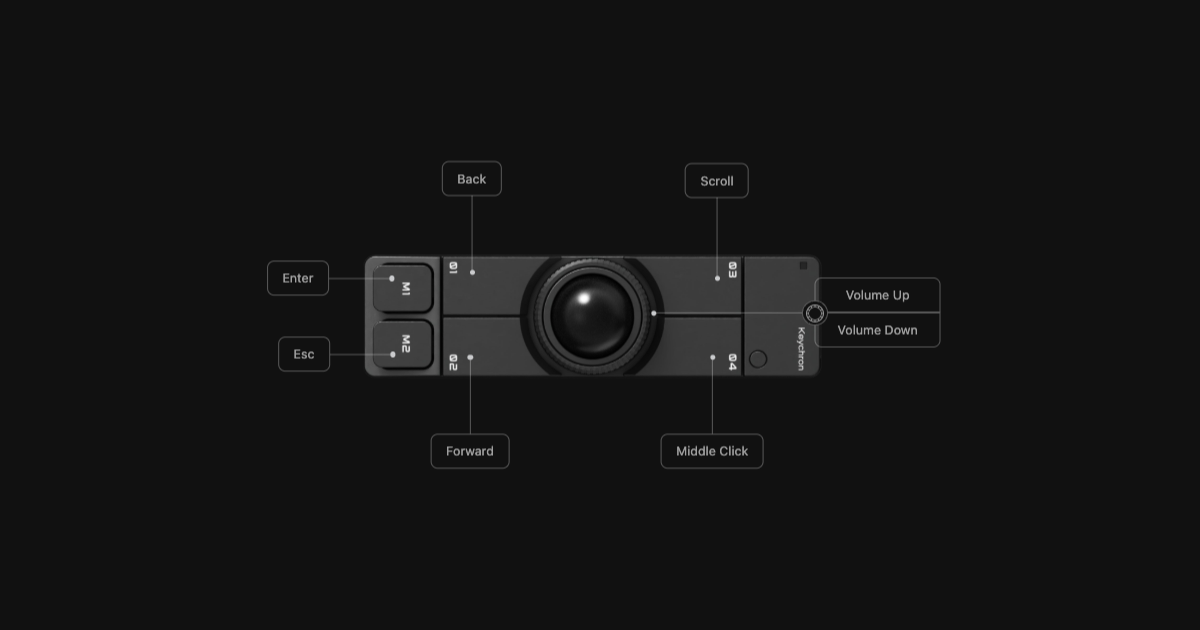
Most of what I do in Claude Code is the same four moves. Talk, send, approve, stop. None of them need a full keyboard. So I gave them to a trackball.
The trackball is a Keychron Nape Pro. It sits under my keyboard, and it isn't my mouse. I still have a mouse and the trackpad for pointing and clicking. That freed me to give up the Nape's two main clicks for something more useful.
The button map
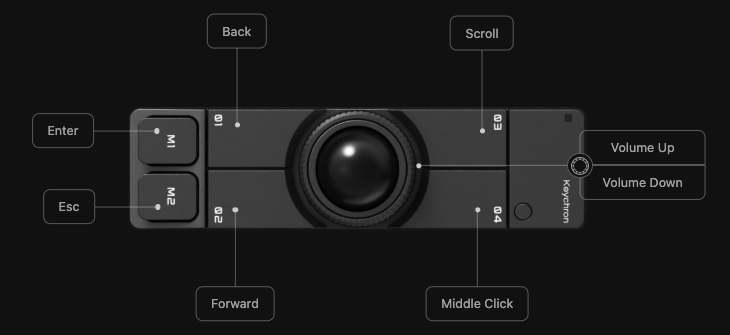
Everything lives on layer 0 in Keychron Launcher, Keychron's web configurator.
- M1 is Enter. Send a prompt, confirm the highlighted choice.
- M2 is Esc. Stop Claude mid-turn, decline a permission prompt, cancel a dictation.
- 04 is Middle Click. That's my Wispr Flow key.
- 01 and 02 are Back and Forward.
- 03 is Scroll, so the ball scrolls the page.
- The ring around the ball stays on volume, the default.
04 ships as a rotate key that turns the ball's orientation an eighth of a turn per press (Aftermath's review covers it). I traded it for voice and haven't missed it.
The middle button is my microphone
Wispr Flow lets you bind a mouse button to Push to talk, so 04 is my dictation key in every app on the Mac.
Hold it, talk, let go, and the text lands wherever the cursor is. Double-click it and Wispr goes hands-free, because double-tapping Push to talk starts hands-free mode even without its own shortcut. That's why I left Hands-free unbound.
Esc plays nicely with it. On a Mac, Wispr only keeps Esc to itself while it's recording. So M2 cancels a dictation that went sideways, and the same press never also stops Claude. When I'm not dictating, Esc goes straight through.
Two catches from Wispr's docs. A mouse button bound in Wispr stops reaching other apps, so middle-click no longer opens links in a new tab. And Wispr only takes mice it recognizes with more than three buttons. The Nape qualifies.
Enter and Esc run the Claude Code loop
The loop is hold 04 and talk, release, tap M1. If Claude heads the wrong way, I tap M2, dictate the correction and tap M1 again. My hands never go back to the keyboard for any of it.
Here's what the two keys do, per Claude Code's interactive mode docs:
- Enter sends the prompt. While Claude is still working, it queues the message instead of interrupting.
- Esc interrupts the turn and keeps the work done so far. It also closes dialogs and declines a permission prompt, the same as answering No.
- Esc twice clears the draft and saves it to history. On an empty prompt it opens the rewind menu.
The Nape sends real Enter and Esc keystrokes, so every other agent CLI and chat app gets the same two buttons for free. Each tool decides what Esc means, though, so check its shortcuts before you trust M2 there.
Set it up yourself
Two apps. Keychron Launcher for the buttons and Wispr Flow for the shortcut.
- Plug the Nape Pro in over USB and open Keychron Launcher in a Chromium browser.
- Go to Customize and stay on layer 0.
- Click M1 and pick Enter from the key grid. Click M2 and pick Esc.
- Click 04 and pick Middle Click from the Basic row.
- Hit Export to save a JSON backup. The keymap itself lives on the mouse, so it follows it to any computer.
- In Wispr Flow, click the Flow icon in the menu bar, then Shortcuts.
- On Push to talk, click Change and press 04. Mouse shortcuts save on press.
- Leave Hands-free unbound and keep Cancel on Esc.
- Open Claude Code. Hold 04 and talk, release, tap M1.
If the Nape is your only pointer, put left and right click on a second layer. I skipped that. With a mouse and trackpad right there, a second layer is one more mode to get wrong, and the wrong mode turns Send into a stray click.
The keyboard still does the typing. It just does a lot less of it.
Related Posts
The real shift was not becoming a power user. It was realizing the model was no longer the main variable. The surrounding system was.
Canceling Cursor was not a dramatic decision. The overlap phase was already over. Claude Code is the default and has been for a while.
The switch was not clean. The old lane still existed, but the terminal was already taking the work that mattered most before I was ready to call it the default.